
محفظة بطاقات للموبايل مع مسكة وأستاند لاصق 3M
- حالة التوفر: متوفر
- الماركة: K&M
الخيارات المتاحة:
أصناف مميزة من نفس القسم


تفاصيل المنتج
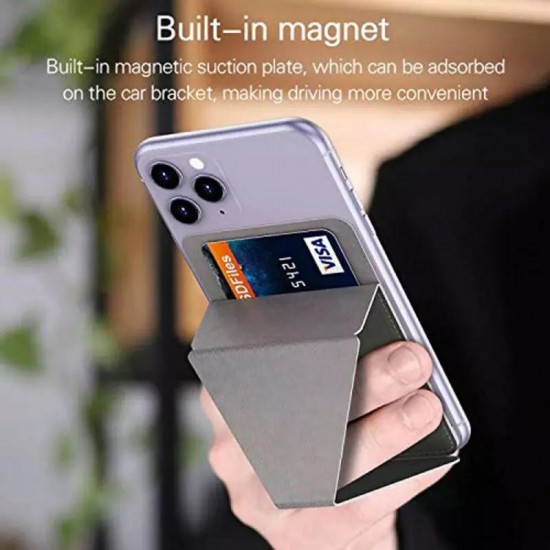
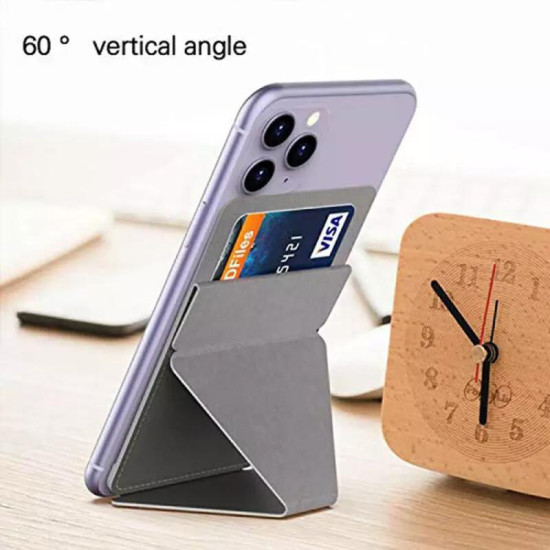
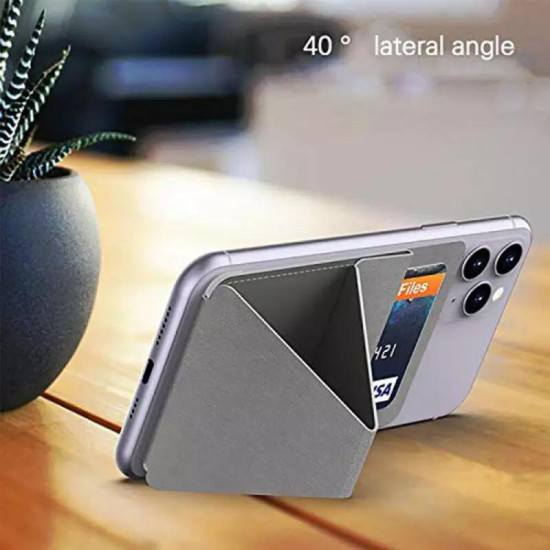
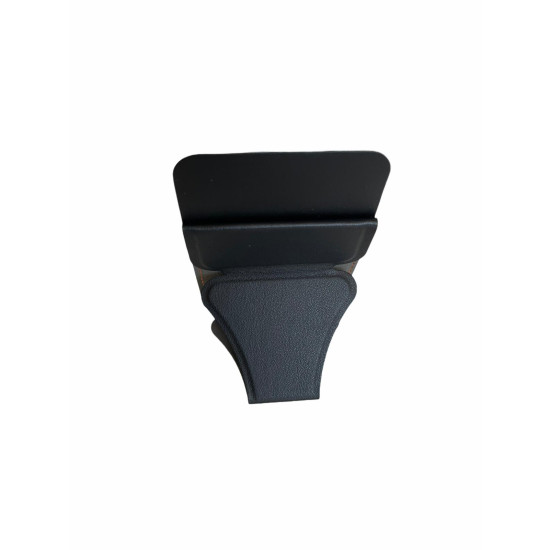
إكسسوار عملي يثبت خلف الهاتف أو غطاء الهاتف المسطح ليجمع ثلاث وظائف في تصميم واحد: محفظة للبطاقات الأساسية، ومسكة أصابع تساعد على التحكم بالهاتف، وأستاند قابل للطي للمشاهدة دون الحاجة إلى حمل الجهاز باستمرار.
- محفظة خلفية لحفظ البطاقات الأساسية.
- لاصق 3M قوي وفق وصف صفحة المنتج.
- مسكة أصابع مدمجة لتحسين التحكم بالهاتف.
- تتحول إلى أستاند قابل للطي للمشاهدة دون استخدام اليدين.
- تصميم نحيف وخفيف للاستخدام اليومي.
- تركيب بسيط دون براغي أو أدوات.
- مناسبة لمعظم الهواتف وأغطية الهاتف ذات الأسطح المسطحة.
- مفيدة للعمل والدراسة والسفر ومكالمات الفيديو.
قد يكون حمل الهاتف والمحفظة بصورة منفصلة غير مريح في المشاوير السريعة، كما قد يصعب تثبيت الهاتف أثناء مشاهدة الفيديو أو إجراء مكالمة مرئية. توفر هذه المحفظة مكانًا للبطاقات ومسكة وأستاند خلفي ضمن قطعة واحدة صغيرة.
- حمل بطاقة الهوية أو بطاقات الاستخدام اليومي.
- تحسين مسكة الهاتف أثناء التصفح أو التقاط الصور.
- مشاهدة الفيديو على المكتب أو الطاولة.
- إجراء مكالمات الفيديو دون حمل الهاتف باستمرار.
- الاستخدام أثناء العمل أو الدراسة أو السفر.
- تقليل الحاجة إلى حمل محفظة كبيرة في المشاوير القصيرة.
- يجب أن يكون ظهر الهاتف أو الغطاء مسطحًا ونظيفًا وجافًا.
- حدد مكان التركيب قبل إزالة غطاء اللاصق.
- تأكد من عدم تغطية الكاميرا أو الفلاش أو حساس البصمة.
- تحقق من وجود مساحة كافية للمحفظة دون خروجها عن حواف الهاتف.
- قد لا يلتصق جيدًا بأغطية السيليكون اللينة أو الأسطح الخشنة والمزخرفة والمنحنية.
- قد يؤثر موقعه وسماكته في الشحن اللاسلكي أو الملحقات المغناطيسية؛ لا يتم ضمان التوافق معهما.
- انزع غطاء الهاتف إذا كنت ستثبت المحفظة مباشرة على الجهاز.
- نظف السطح جيدًا من الغبار والزيوت والرطوبة ثم اتركه يجف.
- ضع المحفظة مؤقتًا في المكان المطلوب دون إزالة حماية اللاصق، وتأكد من ملاءمة الموقع.
- انزع الطبقة الواقية من اللاصق دون لمس سطحه بالأصابع.
- ثبت المحفظة بصورة مستقيمة واضغط على كامل سطحها بالتساوي.
- اترك اللاصق حتى يثبت بالكامل وفق تعليمات العبوة قبل وضع البطاقات أو الاعتماد على المسكة.
- ابدأ ببطاقة واحدة واختبر ثباتها قبل إضافة بطاقات أخرى.
- كمحفظة: أدخل البطاقة بالكامل وتأكد من عدم انزلاقها عند قلب الهاتف.
- كمسكة: أدخل إصبعك بهدوء دون شد المسكة أو تعليق الهاتف منها.
- كأستاند: افتح الجزء القابل للطي وضع الهاتف على سطح مستوٍ وثابت.
- بعد الاستخدام: أعد طي الحامل لتقليل البروز خلف الهاتف.
- لم تحدد صفحة المنتج عددًا ثابتًا للبطاقات.
- تعتمد السعة الفعلية على سُمك البطاقات وبروز الحروف عليها.
- لا تجبر عدة بطاقات داخل المحفظة إذا أصبحت ضيقة أو تغير شكلها.
- اختبر ثبات البطاقات بعد كل تغيير في العدد.
- عند استخدام بطاقات دفع لاتلامسية متعددة، أخرج البطاقة المطلوبة قبل تمريرها على جهاز القراءة لتجنب قراءة بطاقة غير مقصودة.
- ثلاث وظائف في قطعة واحدة صغيرة.
- تبقي البطاقات الأساسية قريبة من الهاتف.
- تساعد على تحسين التحكم بالهاتف أثناء الاستخدام اليومي.
- توفر وضعية مشاهدة مريحة على المكتب أو الطاولة.
- لا تحتاج إلى أدوات أو براغي للتركيب.
بطاقات منفصلة، ومسكة أقل راحة، والحاجة إلى إسناد الهاتف بأشياء أخرى عند مشاهدة الفيديو.
محفظة ومسكة وأستاند خلف الهاتف ضمن إكسسوار واحد مدمج.
- أخرج البطاقات قبل تنظيف المحفظة.
- امسح السطح بقطعة قماش ناعمة وجافة أو رطبة قليلًا.
- تجنب غمرها بالماء أو استخدام الكحول والمذيبات والمنظفات القوية.
- أبعدها عن الحرارة المرتفعة وأشعة الشمس المباشرة لفترات طويلة.
- افحص حواف اللاصق والمفصل والمسكة دوريًا.
- أوقف استخدامها إذا بدأ اللاصق بالانفصال أو ظهرت تشققات أو ضعف في المسكة.
- هاتف أو غطاء هاتف ذو ظهر صلب ومسطح.
- عدد قليل من البطاقات الأساسية التي تحتاجها يوميًا.
- حاجة إلى مسكة وأستاند مدمجين خلف الهاتف.
- رغبة في إكسسوار خفيف وسهل التركيب.
- كان الغطاء مصنوعًا من السيليكون اللين أو ذا سطح خشن أو قماشي أو منحني.
- كانت مساحة ظهر الهاتف صغيرة أو تحتوي على كاميرا كبيرة أو حساس بصمة مركزي.
- كنت تعتمد باستمرار على الشحن اللاسلكي أو ملحقات MagSafe.
- كنت تحتاج إلى سعة بطاقات رقمية محددة غير موضحة في الصفحة.
- كنت تحتاج إلى حماية RFID؛ فهذه الميزة غير مذكورة.
- كنت تريد ملحقًا قابلًا للإزالة وإعادة التركيب بصورة متكررة.
| الخاصية | التفاصيل |
|---|---|
| نوع المنتج | محفظة بطاقات لاصقة خلف الهاتف |
| الوظائف | محفظة بطاقات، مسكة أصابع وأستاند قابل للطي |
| نوع التثبيت | لاصق 3M وفق صفحة المنتج |
| التوافق | معظم الهواتف وأغطية الهاتف المسطحة بعد اختبار السطح والمساحة |
| عدد البطاقات | غير محدد؛ يعتمد على سُمك البطاقات |
| الخامة | غير محددة في صفحة المنتج |
| الأبعاد والوزن | غير محددة |
| حماية RFID | غير مذكورة |
| الشحن اللاسلكي | غير مضمون وقد تعيق المحفظة الشحن حسب الهاتف والموضع والسُمك |
| اللون | يُختار من الخيارات المتوفرة في صفحة المنتج |
| محتويات العبوة | قطعة واحدة من محفظة البطاقات مع المسكة والأستاند |
- المسكة تساعد على التحكم بالهاتف لكنها لا تضمن منعه من السقوط.
- لا تحمل الهاتف من المسكة فوق حافة أو مكان مرتفع.
- لا تفرط في تعبئة المحفظة أو تجبر البطاقات داخلها.
- اختبر ثبات البطاقات واللاصق قبل كل استخدام خارج المنزل.
- قد يؤدي نزع اللاصق إلى ترك بقايا أو التأثير في بعض الطلاءات والأغطية.
- لا تخزن الرقم السري مع بطاقة الدفع ولا تعتبر المحفظة وسيلة ضد السرقة.
- أخرج البطاقات الحساسة قبل تعريض الهاتف للحرارة أو الرطوبة.
- ضع الأستاند على سطح مستوٍ ولا تضغط على الهاتف بقوة وهو مثبت عليه.
هل تناسب جميع الهواتف؟
تناسب معظم الهواتف والأغطية المسطحة، لكن يجب التحقق من مساحة الظهر وموقع الكاميرا والبصمة ونوع سطح الغطاء.
كم بطاقة تتسع؟
لا تحدد الصفحة عددًا ثابتًا. تعتمد السعة على سُمك البطاقات، ويجب عدم الإفراط في تعبئتها.
هل يمكن استخدامها كحامل؟
نعم، تحتوي على أستاند خلفي قابل للطي للمشاهدة ومكالمات الفيديو على سطح ثابت.
هل اللاصق قوي؟
تصف الصفحة اللاصق بأنه 3M قوي، لكن الأداء يعتمد على نظافة السطح واستوائه وطريقة التركيب.
هل تناسب أغطية السيليكون؟
لا يمكن ضمان ذلك؛ عادةً يكون الالتصاق أفضل مع الأسطح الصلبة والملساء والمسطحة.
هل تدعم الشحن اللاسلكي؟
لم تُذكر هذه الميزة، وقد تمنع سماكة المحفظة وموضعها الشحن اللاسلكي أو استخدام بعض الملحقات المغناطيسية.
هل توفر حماية RFID؟
لا، لا توجد حماية RFID مؤكدة في صفحة المنتج.
- حامل جوال لفتحة تكييف السيارة بدوران 360 درجة – لتثبيت الهاتف داخل السيارة أثناء استخدام الخرائط.
- ستاند جوال ألمنيوم للمكتب – خيار ثابت لمشاهدة الهاتف أثناء العمل أو الدراسة.