
Smart Home Office Organization Ideas Using Practical Storage Solutions
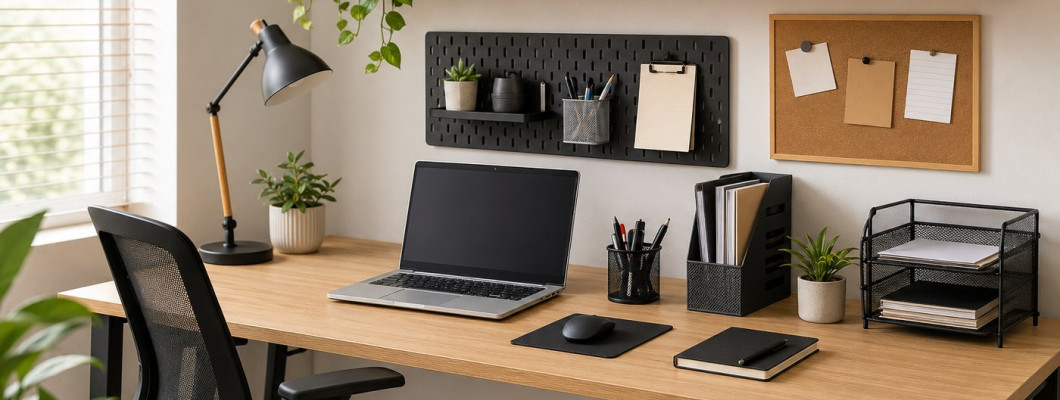
Smart Home Office Organization Ideas Using Practical Storage Solutions
A Practical Guide to Creating an Organized, Efficient, and Clutter-Free Home Workspace
A home office has become an essential part of many homes, whether it is used for remote work, studying, running a business, or managing everyday tasks. With regular use, however, papers, pens, devices, cables, files, and office supplies can quickly accumulate and make the workspace feel crowded.
Organizing a home office does not necessarily require a large room, expensive furniture, or a complete redesign. In many cases, a noticeable improvement can be achieved by removing unnecessary items, assigning a specific place to each essential item, using drawers and vertical space efficiently, and choosing storage solutions that match the size and function of the workspace.
An organized office makes frequently used tools and documents easier to access. It also helps keep the main work surface clear and makes daily cleaning and maintenance easier.
────────────────────────
Quick Answer
What is the best way to organize a home office?
Start by removing items you no longer need and keep only frequently used essentials on the desktop. Organize drawers with suitable dividers, create separate categories for important documents, manage cables neatly, and use shelves or vertical storage when floor space is limited.
The key is to give every item a specific and logical place where it can be easily accessed and returned after use.
────────────────────────
Table of Contents
• Why is home office organization important?
• What are the benefits of an organized home office?
• What should stay on your desk?
• How to evaluate your workspace before organizing.
• How to declutter unnecessary office items.
• How to organize your desktop.
• How to organize drawers and office supplies.
• How to organize papers and files.
• How to manage electronic devices and cables.
• How to use walls and vertical space.
• Best storage solutions for a small home office.
• How to choose suitable office organizers.
• Common home office organization mistakes.
• Daily habits that help maintain an organized workspace.
• Home office organization checklist.
• Frequently asked questions.
• Conclusion.
• Related articles.
────────────────────────
Why Is Home Office Organization Important?
A workspace usually contains many different items, including a computer, notebooks, documents, pens, chargers, files, and electronic devices.
Without a clear organization system, desktops and drawers can gradually become crowded, making it harder to find even simple items when they are needed.
Organizing your home office can help you:
• Access frequently used tools more easily.
• Reduce paper and document clutter.
• Create more usable desktop space.
• Make better use of drawers and shelves.
• Keep devices and cables organized.
• Make the workspace easier to clean.
• Maintain a cleaner and more comfortable appearance.
• Spend less time searching for everyday items.
An organized office does not need to be completely empty. The goal is to keep the things you actually need arranged in a practical and accessible way.
────────────────────────
What Are the Benefits of an Organized Home Office?
Good organization makes a workspace easier to use every day.
When you know where each file and tool belongs, you do not need to search through several drawers or piles of papers every time you need something.
Reducing unnecessary items around you also creates more room for working, writing, reviewing documents, and using your computer comfortably.
Some of the most practical benefits include:
Easier Start to the Workday
When your desk is already organized and ready to use, you can begin your tasks without having to clear the workspace first.
Faster Access to Documents
A simple filing system can make important documents easier to locate when you need them.
Easier Daily Reset
When every item has a designated place, restoring order at the end of the day requires less time.
Better Use of Available Space
Shelves, drawer organizers, and properly sized storage boxes can provide additional storage without requiring a larger desk.
Easier Cleaning
The fewer unnecessary objects you keep on the desktop, the easier it becomes to clean and maintain the workspace.
────────────────────────
What Should Stay on Your Desk?
Ideally, your desktop should contain only items that you use every day or very frequently.
These may include:
• Computer or laptop.
• Keyboard and mouse.
• Current notebook.
• A limited number of pens.
• Desk lamp when needed.
• Phone or phone stand.
• Documents related to your current task.
Extra office supplies, old files, spare cables, and rarely used stationery are better stored in drawers, boxes, cabinets, or on shelves.
────────────────────────
The Daily-Use Rule
Look at every item on your desktop and ask:
Do I use this every day?
If the answer is yes, keeping it within easy reach may make sense.
If you only use the item once a week or once a month, consider moving it to another storage area.
This simple rule helps prevent the desktop from gradually becoming a permanent storage area.
────────────────────────
Essential Storage Solutions for a Home Office
You do not need a large collection of organizers. Start with storage solutions that address actual problems in your workspace.
Drawer Organizers
Drawer organizers can separate pens, paper clips, sticky notes, chargers, and other small office supplies.
File Holders
File holders are useful for documents you frequently access or papers that require attention.
Wall Shelves
Wall shelves use vertical space for books, files, storage boxes, and less frequently used supplies.
Storage Boxes
Storage boxes can hold spare stationery, cables, small devices, and supplies that do not need to remain on the desktop.
Cable Organizers
Cable organizers help keep computer cables, chargers, and other wires from becoming tangled around the workspace.
Rolling Storage Carts
A compact rolling cart can provide additional storage when the desk does not have enough drawers.
You can also explore practical home and workspace organization solutions from K&M Shopping at:
Choose organizers according to the dimensions of your workspace and the items you actually need to store rather than selecting them based only on appearance.
────────────────────────
How Do You Choose the Right Storage Solution?
Before buying a new organizer, identify the specific problem you want it to solve.
If pens and small accessories are mixed together inside a drawer, drawer dividers may be the right solution.
If papers constantly accumulate on the desktop, a simple filing system may be more useful.
If books are taking up valuable workspace, wall shelves may provide a better solution.
If cables are the main source of clutter, organize the wiring before adding more storage boxes.
Choosing storage according to the problem helps create a more practical system and reduces unnecessary purchases.
────────────────────────
Organize Items by Frequency of Use
Divide office items into three basic groups:
Daily Use
Keep these items on the desktop or in the nearest drawer.
Weekly Use
Store them in another drawer or on an easily accessible shelf.
Occasional Use
Place them in storage boxes, cabinets, or higher shelves.
This approach gives frequently used items the most convenient storage locations while preventing rarely used supplies from occupying valuable workspace.
────────────────────────
A Simple Principle Before You Start Organizing
Home office organization does not begin with buying storage boxes.
Start by understanding what you already have, removing unnecessary items, and identifying the tools and documents you actually need.
Then choose storage solutions that fit those items and the available space.
The simpler and more logical the organization system is, the easier it will be to maintain over time.
How to Evaluate Your Home Office Space Before Organizing
Before buying shelves, storage boxes, or drawer organizers, take time to evaluate your current workspace. This helps you understand what storage space is already available and what you actually need.
Look at the entire work area and identify:
• Available desktop space.
• Number and size of drawers.
• Empty wall space.
• Space underneath the desk.
• Areas beside the desk.
• Unused corners.
• Space above the workstation.
• Existing cabinets or shelves.
Next, identify the items you use every day, the supplies you need occasionally, and the things that can be stored farther away from the main work area.
────────────────────────
Measure Before Buying Organizers
Knowing the dimensions of your storage areas can prevent you from buying organizers that do not fit.
Measure:
• Drawer width.
• Drawer depth.
• Drawer height.
• Available space under the desk.
• Wall width for potential shelving.
• Space between the desk and wall.
• Available height above the desktop.
• Space beside the desk.
Keep these measurements available when shopping for storage boxes, drawer organizers, shelves, or other office storage products.
This is especially important in a small home office, where even a small difference in dimensions can determine whether an organizer fits properly.
────────────────────────
Declutter Before You Organize
The best time to reduce clutter is before placing items into new organizers.
Remove the contents of your drawers and review everything on your desktop and shelves. Then divide the items into simple categories.
Keep
Keep tools, supplies, and documents that you actually use or need.
Relocate
Return anything that belongs in another room or area of the home to its proper location.
Review
Some documents or supplies may require a decision before you know whether to keep or remove them.
Remove
Discard broken pens, empty packaging, unnecessary papers, and damaged items that no longer serve a useful purpose, using an appropriate disposal or recycling method when applicable.
After decluttering, you may discover that you need much less storage than you originally expected.
────────────────────────
A Simple Way to Sort Office Supplies
If you have many office supplies, organize them according to how often you use them.
Group One: Daily Use
Examples include:
• Essential pens.
• Current notebook.
• Computer accessories.
• Frequently used work tools.
Keep these items closest to your main work area.
Group Two: Frequent Use
Examples include:
• Stapler.
• Scissors.
• Highlighters.
• Frequently referenced files.
• Chargers used regularly.
These items can be stored in nearby drawers or on an accessible shelf.
Group Three: Occasional Use
Examples include:
• Extra stationery.
• Spare cables.
• Older files that must be retained.
• Supplies used only for specific projects.
These items can be stored on higher shelves, inside labeled boxes, or in storage areas farther from the desktop.
────────────────────────
How to Organize Your Desktop
After removing unnecessary items, clear the desktop completely and return only the essentials.
Start with your computer or laptop, then add the tools you regularly need while working.
Try to maintain a clear section of the desk for writing, reviewing documents, or completing other tasks.
A practical everyday desktop may include:
• Computer or laptop.
• Keyboard and mouse.
• Small pen holder.
• Current notebook.
• Desk lamp.
• Phone stand when needed.
• Documents related to the current task.
Avoid using the desktop as permanent storage for stacks of papers, books, boxes, or unused equipment.
────────────────────────
Divide the Desk Into Work Zones
A simple way to improve organization is to divide the desk according to function.
Computer Zone
Use the main area for your computer, monitor, keyboard, and mouse.
Writing Zone
Keep enough open space for writing, reading, or reviewing documents.
Supply Zone
Keep frequently used pens and small office tools together instead of spreading them across the desk.
Temporary Document Zone
Use a small file holder or tray for papers related to current tasks.
Charging Zone
Designate one location for charging your phone and other small devices instead of placing chargers in different areas.
Creating clear zones makes it easier to know where items belong and helps prevent clutter from spreading across the workspace.
────────────────────────
How to Organize Desk Drawers
A closed drawer is not necessarily an organized drawer.
When pens, clips, chargers, cables, and other supplies are mixed together, finding a small item can become unnecessarily difficult.
Use drawer dividers or small organizers to create separate sections.
The nearest drawer can hold everyday supplies such as:
• Pens.
• Sticky notes.
• Paper clips.
• Highlighters.
• Small office tools.
Another drawer can be used for less frequently needed items such as:
• Chargers.
• Spare cables.
• Extra stationery.
• Small electronic accessories.
Avoid filling every section completely. Leaving some available space makes it easier to add new supplies without immediately creating clutter.
────────────────────────
Should You Label Office Organizers?
Labels can be helpful when you have several similar boxes, folders, or containers, especially when their contents are not visible.
Simple labels might include:
Documents
Cables
Stationery
Bills
Work Files
Extra Supplies
Not every organizer needs a label. Use labels where they make it faster and easier to identify what belongs inside.
────────────────────────
How to Organize Papers and Files
Paper is one of the most common sources of home office clutter.
Instead of keeping documents in one large pile, divide them according to purpose.
Useful categories may include:
• Action required.
• To be filed.
• Important bills and receipts.
• Work documents.
• Study documents.
• Important personal records.
• Papers that are no longer needed.
Use separate folders or file sections with clear names, and return documents to the appropriate location after using them.
────────────────────────
Create a Simple System for Incoming Papers
Give every new paper entering your workspace one temporary destination.
A document organizer can be divided into three simple categories:
Action
For documents that require a task, response, payment, or follow-up.
File
For papers that have already been handled but need to be stored permanently.
Review
For documents that need to be read or evaluated before a decision is made.
A single collection point for incoming documents can prevent papers from spreading across the desktop.
────────────────────────
Reduce Unnecessary Paper Storage
Not every document needs to remain in paper form.
When appropriate, some documents can be stored digitally instead of keeping additional physical copies.
Organize digital files into clearly named folders such as:
Work
Bills
Projects
Personal Documents
Study
Use descriptive filenames so you can understand what a document contains without opening every file.
Important original documents that must be retained should be stored securely in a location appropriate for their importance.
────────────────────────
How to Organize Books and Reference Materials
If books are part of your daily work or study routine, keep the most frequently used titles on an accessible shelf.
You can organize them into categories such as:
• Daily references.
• Work-related books.
• Study materials.
• Notebooks.
• Occasionally used books.
Keep frequently referenced materials nearby and move rarely used books to higher or more distant shelves.
────────────────────────
How Do You Organize a Desk Without Drawers?
A desk without built-in drawers can still be organized effectively.
Consider using:
• A compact rolling storage cart.
• Storage boxes on a nearby shelf.
• Wall-mounted shelves.
• A vertical file holder.
• Small organizers for everyday supplies.
• A separate drawer unit under the desk if space allows.
Prioritize vertical storage so that you do not fill the surrounding floor space with unnecessary furniture.
────────────────────────
Quick Answer
How can you prevent papers from piling up on your desk?
Create one designated place for incoming papers and separate them into documents that require action, documents that need to be filed, and papers that can be removed. Avoid using the desktop as permanent document storage, and review incoming papers regularly.
────────────────────────
The One-Place Rule
One of the simplest ways to maintain an organized home office is to give each category of items one consistent storage location.
One place for pens.
One place for spare cables.
One place for incoming papers.
One place for important files.
One place for extra stationery.
When storage locations are clear and predictable, items are less likely to be left in random places, and resetting the workspace becomes much faster.
How to Organize Cables and Electronic Devices
Tangled cables can make a home office look cluttered even when the desktop itself is organized. This becomes more noticeable when a computer, monitor, printer, phone, chargers, and other electronic devices are used in the same workspace.
Start by reviewing all cables around the desk and identify the device connected to each one.
Remove old or unused cables, then organize the necessary wires using practical solutions such as:
• Cable clips.
• Reusable cable ties.
• Cable holders.
• Under-desk cable organizers.
• Suitable cable management boxes when needed.
The goal is to reduce visible cable clutter while keeping essential connections easy to access.
────────────────────────
How Can You Prevent Cables From Tangling Behind the Desk?
Start by disconnecting cables that are no longer in use, then group wires that run in the same direction.
Follow these simple steps:
1. Identify the device connected to each cable.
2. Remove cables you no longer need.
3. Group wires that lead to the same area.
4. Secure cables so they do not fall behind the desk.
5. Leave enough cable length to move devices when necessary.
6. Label similar cables if they are difficult to identify.
Avoid bending cables sharply or placing heavy furniture directly on top of them.
────────────────────────
Create a Dedicated Charging Zone
Multiple chargers spread across the desk can quickly create visual clutter.
Instead, create one dedicated area for charging small electronic devices.
It may include:
• Phone charger.
• Smartwatch charger.
• Headphone charger.
• Tablet charging cables.
• Phone stand.
Place the charging zone on one side of the desk or on a nearby shelf where it is easy to reach without occupying the main work surface.
────────────────────────
Organize Computer Accessories
Small computer accessories such as external drives, adapters, cables, and headphones can easily become misplaced when they do not have a designated storage location.
Use a drawer or storage box specifically for electronic accessories and divide the contents by category.
For example:
• USB cables.
• Adapters.
• Storage devices.
• Headphones.
• Computer accessories.
• Spare chargers.
When a cable belongs to a specific device, keep it with that device whenever practical or label it clearly.
────────────────────────
Use Walls and Vertical Space
When floor and desktop space are limited, walls can provide valuable additional storage.
Shelves above the desk can be used for:
• Books.
• Files.
• Storage boxes.
• Notebooks.
• Extra stationery.
• Less frequently used supplies.
Using vertical space can increase storage capacity without reducing the available floor area.
Avoid filling every shelf completely. Leaving some open space between items can make frequently used objects easier to access and help the workspace feel less crowded.
────────────────────────
What Should You Store on Shelves Near the Desk?
Use the most accessible shelves for items you need regularly.
These may include:
• Reference books.
• Current files.
• Notebooks.
• Supplies used throughout the week.
Higher shelves can be reserved for less frequently used items such as:
• Extra supplies.
• Older files that need to be retained.
• Boxes containing cables and accessories.
• Supplies used only for specific projects.
This keeps the most valuable storage areas available for the items you use most often.
────────────────────────
Use the Space Under the Desk
The area underneath a desk can provide additional storage, particularly when the desk has few or no built-in drawers.
Possible solutions include:
• A small drawer unit.
• A rolling storage cart.
• A file holder.
• A box for extra supplies.
• A compact accessory organizer.
However, avoid filling the entire area underneath the desk.
Maintain enough room for comfortable sitting and leg movement, and make sure storage units do not interfere with normal use of the workspace.
────────────────────────
Best Ways to Organize a Small Home Office
When space is limited, focus on using the available area efficiently rather than adding more furniture.
Start with these ideas:
• Keep only daily essentials on the desktop.
• Use walls for additional shelving.
• Maximize drawer space with dividers.
• Use under-desk storage when it does not restrict movement.
• Choose vertical storage instead of wide storage units.
• Reduce unnecessary paper.
• Organize cables instead of leaving them on the floor or behind the desk.
• Choose storage solutions that can serve more than one purpose.
Even a small corner of a bedroom or living room can become a practical workspace when each area has a clear function.
────────────────────────
Use a Rolling Storage Cart
A compact rolling cart can be useful when a desk does not provide enough drawer space.
It can store:
• Notebooks.
• Stationery.
• Files.
• Creative supplies.
• Small electronic devices.
• Extra work supplies.
Because it can be moved easily, the cart can stay beside the desk while you are working and be moved away when additional space is needed.
────────────────────────
Choose Multi-Purpose Storage Solutions
In a small home office, products that provide more than one function can help reduce the amount of furniture required.
Examples include:
• A monitor stand with storage space underneath.
• A desk with built-in drawers.
• Vertical storage units.
• Stackable storage boxes.
• Shelving that combines books and storage containers.
• Organizers that can be used in drawers or on shelves.
The goal is to increase useful storage without making the room feel crowded.
────────────────────────
How Do You Choose the Right Office Organizer?
Before purchasing a new organizer, answer a few practical questions.
What will I store inside it?
Determine the contents before choosing the organizer.
Where will I place it?
Decide whether it will be used inside a drawer, on a shelf, under the desk, or somewhere else.
Does it fit the available space?
Compare the product dimensions with the measurements of the intended location.
How often will I use the contents?
Frequently used items should remain easy to reach, while occasional supplies can be stored farther away.
Does it solve an actual organization problem?
If you cannot identify a specific purpose for an organizer, you may not need it.
────────────────────────
Practical Storage Solutions for Your Workspace
Choosing storage products according to the size and function of your workspace can make everyday organization easier. Drawer organizers, storage boxes, baskets, shelving, and other practical solutions can help create designated places for office supplies and accessories.
You can explore home and workspace organization solutions from K&M Shopping at:
Measure the available space and decide exactly what you need to store before selecting a product. This makes it easier to choose a suitable size and storage solution for your needs.
────────────────────────
How to Organize a Home Office Shared by More Than One Person
When two or more people use the same workspace, assigning individual storage areas can help prevent documents and supplies from becoming mixed together.
Consider providing:
• A separate drawer for each person.
• Individual file sections.
• A personal storage box.
• A designated area on a shelf.
• Separate organizers for personal supplies when needed.
Shared tools can be stored in one central location that everyone can easily access and return items to after use.
────────────────────────
Store Items Close to Where You Use Them
A practical storage system keeps items near the area where they are normally used.
If you frequently use a printer, store paper and related supplies nearby.
If you regularly take notes while working, keep a notebook and pen within easy reach.
If certain files are used every day, place them on a nearby shelf rather than inside a distant storage box.
Items used only occasionally do not need to occupy the most accessible storage areas.
────────────────────────
Quick Answer
How can you add storage to a small home office without making it feel crowded?
Use wall shelves and vertical storage, maximize the space inside drawers, and consider a compact storage unit under the desk if it does not restrict movement. Keep only daily essentials on the desktop and move rarely used supplies to higher or less accessible storage areas.
Common Home Office Organization Mistakes
A home office may look perfectly organized immediately after a cleanup, but clutter can quickly return if the storage system is too complicated or does not match the way you actually use the workspace.
Avoiding the following common mistakes can help you create a practical organization system that is easier to maintain every day.
────────────────────────
1. Buying Organizers Before Measuring the Space
Choosing storage products based only on appearance can result in organizers that do not fit your drawers, shelves, or available workspace.
Before buying, measure:
• Drawer width, depth, and height.
• Available space above the desk.
• Space underneath the desk.
• Wall width available for shelves.
• Space beside the desk.
• Available height for storage units.
After measuring, decide what you need to store and choose organizers that fit both the items and the available space.
────────────────────────
2. Trying to Organize Things You Do Not Need
Organization does not mean finding a storage box for every item you own.
If your drawers are filled with old papers, broken pens, unused cables, and excessive stationery, adding more storage containers may simply move the clutter from one place to another.
Review your office supplies regularly and keep the items you actually use or need.
Reducing unnecessary belongings often creates useful storage space without adding another organizer.
────────────────────────
3. Using the Desktop as Permanent Storage
Your desktop is primarily a work surface, not an additional storage shelf.
Stacks of books, files, boxes, and papers reduce the amount of usable space available for your computer, writing, and other everyday tasks.
Keep daily essentials on the desktop and move other items into drawers, shelves, cabinets, or storage boxes.
────────────────────────
4. Putting Everything Into One Drawer
Placing pens, cables, paper clips, chargers, and other supplies in one large drawer may seem convenient at first, but it can make small items difficult to find.
Use dividers or small organizers to create simple categories.
For example:
• Pens.
• Paper clips.
• Sticky notes.
• Chargers.
• Cables.
• Small office tools.
A simple layout makes it easier to return each item to its designated place after use.
────────────────────────
5. Keeping Too Many Similar Supplies
A home office can gradually accumulate more pens, notebooks, cables, and other supplies than you actually use.
Keep a reasonable quantity in your everyday workspace and store necessary extras separately.
This prevents frequently used drawers from becoming overcrowded with backup supplies.
────────────────────────
6. Ignoring Cable Organization
A desk can appear cluttered even when everything else is organized if cables are tangled around or behind it.
Review the cables in your workspace and confirm that each one still has a purpose.
Group related cables, secure them appropriately, and remove unused wires from the main work area.
────────────────────────
7. Keeping Every Piece of Paper
Not every document needs to be stored permanently.
When a new paper enters your workspace, decide whether it:
• Requires action.
• Needs review.
• Must be retained.
• Can be stored digitally when appropriate.
• Is no longer necessary.
Making this decision early helps prevent paper from accumulating on the desktop.
────────────────────────
8. Having No Place for New Items
Even an organized office can become cluttered when incoming papers and new supplies have no designated location.
Create a small temporary area for documents that require attention and review it regularly.
Avoid allowing this temporary area to become permanent storage.
────────────────────────
9. Storing Daily Essentials Too Far Away
If you use an item several times every day, storing it inside a box on a high shelf or in a distant cabinet makes the organization system less practical.
Arrange storage according to frequency of use:
• Daily: closest to the main work area.
• Weekly: in nearby drawers or on accessible shelves.
• Occasional: on higher shelves or in more distant storage areas.
This reduces unnecessary searching and movement during the workday.
────────────────────────
10. Using Too Many Organization Products
More baskets, boxes, and dividers do not automatically create a better-organized office.
Too many organizers in a small workspace can become another source of clutter.
Give every organizer a specific purpose and leave some available storage space for future needs.
────────────────────────
Daily Habits That Help Keep Your Office Organized
A successful organization system should be easy to maintain.
Simple daily habits can include:
• Returning pens and supplies after use.
• Placing incoming papers in their designated location.
• Returning files to their shelves.
• Removing cups and unrelated household items.
• Returning chargers to their designated area.
• Closing drawers after use.
• Leaving the desktop ready for the next work session.
These steps require very little time when they become part of your regular routine.
────────────────────────
The Five-Minute Reset
Set aside five minutes at the end of your workday to reset the workspace.
Use this time to:
• Return supplies to their proper places.
• Sort new papers.
• Put books and files away.
• Remove unnecessary items.
• Straighten cables when needed.
• Prepare the workspace for the next day.
A short daily reset can prevent small amounts of clutter from becoming a larger organization project.
────────────────────────
Weekly Home Office Review
Once a week, take a few minutes to review the workspace more thoroughly.
Check:
• Accumulated papers.
• Documents you have finished using.
• Files that need to be archived.
• Supplies that are out of place.
• Drawer contents.
• Cables and chargers.
• Supplies that need replenishing.
• The main desktop area.
A weekly review can identify small organization problems before they become difficult to manage.
────────────────────────
Monthly Organization Review
Once a month, review the overall organization system.
Ask yourself:
Are there items I have not used recently?
Are everyday supplies still in the most convenient locations?
Are there completed files that can be archived?
Have any storage boxes become overcrowded?
Is there storage space that could be used more efficiently?
Have my work habits or storage needs changed?
A practical home office organization system should be flexible enough to change with your needs.
────────────────────────
Home Office Organization Checklist
- Remove unnecessary items.
- Measure storage areas before buying organizers.
- Keep only daily essentials on the desktop.
- Give frequently used tools a designated location.
- Divide drawers according to their contents.
- Sort papers and files by purpose.
- Create a location for documents requiring action.
- Organize books and reference materials.
- Manage cables and chargers.
- Use vertical storage when needed.
- Use under-desk storage without restricting movement.
- Keep daily supplies close to the main work area.
- Store backup supplies separately.
- Return items after use.
- Spend a few minutes resetting the workspace each day.
- Review the office once a week.
────────────────────────
How Do You Know if Your Home Office Organization System Works?
A visually tidy workspace is useful, but appearance is not the only measure of successful organization.
Your system is working well when you can:
• Find everyday tools quickly.
• Access important files easily.
• Know where each item should be returned.
• Use the desktop without clearing clutter first.
• Process incoming papers without allowing them to accumulate.
• Clean the workspace easily.
• Maintain the system without excessive effort.
If you constantly need to search for items or completely reorganize the workspace, the system may be too complicated or may not match your daily habits.
────────────────────────
What Should You Do if Clutter Keeps Coming Back?
Do not immediately buy additional organizers.
First, identify where the clutter repeatedly accumulates.
If papers are the problem, improve your document system.
If small supplies collect on the desktop, move their storage location closer to where you use them.
If cables create visual clutter, improve the cable management system.
If drawers are constantly full, review their contents and remove unnecessary items.
The location where clutter repeatedly appears often shows you which part of the organization system needs improvement.
────────────────────────
Quick Answer
How often should you organize a home office?
Return frequently used items to their designated places every day and spend a few minutes each week reviewing papers, drawers, and the desktop. A more complete review can be done monthly to remove unnecessary items, archive older documents, and adjust storage as your needs change.
────────────────────────
How Can You Make a Home Office Feel More Spacious?
You can create a greater sense of space without changing the actual size of the room.
Try to:
• Keep as much of the desktop clear as possible.
• Use vertical storage.
• Group similar items together.
• Reduce the number of visible storage containers.
• Choose storage units that match the size of the workspace.
• Keep rarely used supplies inside drawers, cabinets, or boxes.
• Organize visible cables.
• Avoid adding furniture that is larger than the space requires.
Leaving some open space between items can make the office feel more organized and easier to use.
────────────────────────
Keep the Organization System Simple
The best home office organization system is not necessarily the one with the most storage products or the most complicated categories.
It is the system that you can use consistently without unnecessary effort.
Keep each item in a logical location close to where it is normally used, and reduce the number of steps required to take something out and put it back.
When returning a pen, document, cable, or charger to its place is simple, maintaining an organized workspace becomes much easier over time.
Frequently Asked Questions About Home Office Organization
1. What is the best way to organize a home office?
Start by removing unnecessary items and keep only the essentials you use regularly on the desktop. Give papers, office supplies, cables, and electronic accessories specific storage locations.
Use drawers, shelves, file holders, and storage boxes according to how frequently you use each item. A simple system that makes items easy to access and return is usually easier to maintain over time.
────────────────────────
2. How do you organize a small home office?
In a small workspace, focus on vertical storage instead of adding more furniture.
Consider using:
• Wall shelves.
• Drawer organizers.
• Vertical file holders.
• A compact drawer unit under the desk.
• A rolling storage cart.
• Stackable storage boxes.
Keep rarely used items away from the main work surface, and avoid placing storage units under the desk if they restrict comfortable sitting or movement.
────────────────────────
3. How can I keep my desktop clutter-free?
Keep only items you use every day on the desktop, such as your computer, current notebook, and a limited number of essential office supplies.
Place papers that require attention in a designated file holder and move other supplies into drawers, shelves, or storage containers.
At the end of each workday, spend a few minutes returning everything to its designated location.
────────────────────────
4. What is the best way to organize papers and documents?
Separate documents into clear categories instead of keeping everything in one pile.
Useful categories may include:
• Action required.
• Review.
• To be filed.
• Work documents.
• Important bills and receipts.
• Personal records.
Review papers regularly and keep only the documents you need. When appropriate, some documents can be stored digitally, while important original records should be kept securely.
────────────────────────
5. How do you organize cables in a home office?
Start by removing cables that are no longer needed and identify the device connected to each remaining cable.
Group cables that run in the same direction using suitable ties, clips, or cable organizers, and secure them so they do not fall or become tangled behind the desk.
Creating one charging area for phones and small devices can also reduce the number of loose cables across the workspace.
────────────────────────
6. Are wall shelves useful for a home office?
Yes. Wall shelves can be especially useful when floor space is limited because they provide additional vertical storage without requiring another large piece of furniture.
They can be used for:
• Books.
• Files.
• Storage boxes.
• Notebooks.
• Extra office supplies.
Keep frequently used items on accessible shelves and place less frequently used supplies higher up. Shelves should always be selected and installed appropriately for their intended load and use.
────────────────────────
7. What are the most useful home office organizers?
The best organizers depend on your workspace and what you need to store.
Useful options may include:
• Drawer organizers.
• File holders.
• Storage boxes.
• Cable organizers.
• Small drawer units.
• Wall shelves.
• Rolling storage carts.
• Desktop supply organizers.
You do not need every type of organizer. Choose products that solve a specific storage problem in your workspace.
────────────────────────
8. How can you organize a desk without drawers?
A desk without built-in drawers can still provide an organized workspace by using the surrounding areas efficiently.
Use wall shelves for books and storage boxes, a vertical file holder for documents, and a small desktop organizer for everyday supplies.
If space allows, you can also use a separate drawer unit or rolling cart beside or underneath the desk.
Avoid storing everything directly on the desktop simply because the desk does not have drawers.
────────────────────────
9. How often should you reorganize a home office?
Return frequently used items to their designated places every day and review papers, drawers, and the desktop once a week.
A more complete review can be done monthly to remove unnecessary items, archive older files, clean storage areas, and make sure the current organization system still matches your needs.
────────────────────────
10. How do you choose the right storage products for a home office?
Start by measuring the available space and identifying exactly what you need to organize.
Before choosing a storage product, ask:
• Where will I place it?
• What will I store inside it?
• Does it fit the available space?
• How frequently will I use the contents?
• Will the items remain easy to access?
You can explore home and workspace organization solutions from K&M Shopping at:
https://k-m.store/
Choose storage products according to your actual needs and workspace dimensions so that each organizer serves a clear and practical purpose.
────────────────────────
Conclusion
Organizing a home office does not necessarily require a large room or a large collection of storage products. A practical organization system begins by removing unnecessary items, defining the purpose of each area, and choosing storage solutions that match the way you use your workspace.
Keep daily essentials close to you, use drawers and shelves for other supplies, organize papers before they accumulate, manage cables carefully, and take advantage of walls and vertical storage when space is limited.
Most importantly, create a simple system that you can maintain consistently. If taking out an item and returning it to its designated place is easy, your workspace is more likely to remain organized over time.
Start with one area instead of trying to change everything at once. Organize the desktop first, then move to drawers, papers, cables, and shelves. Improving the workspace gradually can make the process easier to manage.
────────────────────────
Quick Summary
For a more organized home office:
• Remove unnecessary items.
• Keep daily essentials within easy reach.
• Maintain clear desktop space.
• Organize drawers with suitable dividers.
• Sort papers and files by purpose.
• Manage cables and chargers.
• Use walls for vertical storage.
• Use under-desk space without restricting movement.
• Measure the available space before buying organizers.
• Spend a few minutes each day resetting the workspace.
────────────────────────
Related Articles
• Smart Kids Room Organization Ideas Using Practical Storage Solutions.
• Smart Bedroom Organization Ideas Using Practical Storage Solutions.
• Smart Laundry Room Organization Ideas Using Practical Storage Solutions.
• Smart Bathroom Organization Ideas Using Practical Storage Solutions.
• Smart Kitchen Organization Ideas for Small Spaces.
• Practical Home Storage Ideas for Small Spaces.
────────────────────────
Thank You for Reading!
An organized workspace can make everyday tasks easier and help you use your home office more efficiently, regardless of its size.
Start with the items you use most often, give everything a clear storage location, and choose organization solutions that fit the available space rather than adding unnecessary products.
To explore organization and storage options for your home office and other areas of the home, visit K&M Shopping:
Leave a Comment