
Airplane and Desk Phone Holders: How to Check Fit and Set Up Your Screen
Airplane and Desk Phone Holders: How to Check Fit and Set Up Your Screen
Watching something on your phone sounds straightforward until you need somewhere to put it. On a desk, it competes with your notebook and keyboard. During a flight, the available space may also need to accommodate food, a drink and other personal items.
A portable phone holder can provide a place for the screen, but choosing one requires more than checking whether it folds. Your phone must fit its grip, the mounting arrangement must suit the available space, and the screen must remain accessible during the activity you have planned.
The most useful approach is to assess the complete setup: phone, case, holder, surface and surrounding objects. This guide explains how to make that assessment, practise before travelling and decide when a different arrangement would be simpler.
Quick Answer
Choose an airplane and desk phone holder by checking your phone with its everyday case, confirming the holder’s stated compatibility and evaluating the intended mounting location separately. Rehearse viewing, touching the screen and removing the phone. On an aircraft, use the accessory only when permitted by the cabin crew and when it does not interfere with the seat, tray or another passenger’s space.
Contents
Choose the task before the accessory
Check phone fit and mounting fit separately
Measure the phone with its case
Review the available product details
Plan the desk layout
Adjust the screen for the activity
Rehearse before travelling
Prepare for changes during a flight
Check charging and audio access
Avoid common setup mistakes
Maintain and review the arrangement
Checklist and quick answers
Ten frequently asked questions
Step-by-step starting plan
Conclusion and quick summary
Choose the Task Before the Accessory
Start by describing what you want to do without continuously holding your phone. Watching a downloaded programme, attending an online lesson and taking part in a video call place different demands on the setup.
For viewing, you may only need occasional access to playback controls. During a lesson, you might pause repeatedly while writing notes. A video call introduces another requirement: the camera needs an appropriate view, not just a convenient screen angle.
Think about the end of the activity too. Will you leave the holder on your desk or fold it into a bag? Will you need to clear the surface quickly?
These questions help you choose a practical arrangement rather than one that looks appealing only when everything is stationary. The accessory should fit your activity, including the transitions before and after it.
Check Phone Fit and Mounting Fit Separately
A clamp-style holder involves two distinct compatibility questions. One concerns the device being held. The other concerns the place supporting the holder.
A suitable phone width does not establish that a desk edge will fit the mounting clamp. Likewise, a compatible edge does not tell you whether your phone case allows a secure, unobstructed grip.
When comparing products, write down these questions separately. Look for the phone-clamp range and any published mounting requirements. If an important measurement is missing, ask about that specific measurement rather than requesting a general assurance that the product will work.
Photographs can explain a configuration, but a desk that resembles yours may have a different edge profile or structure underneath. Assess the actual contact area, not the overall appearance of the furniture.
Measure the Phone with Its Everyday Case
Leave the case attached if that is how you intend to use the phone. Measure across the relevant width, including protective corners that extend beyond the device itself.
Then examine the thickness and shape. A rear grip, card wallet or raised feature can affect how the phone rests against a holder, even when the width falls within the published range.
Check the buttons and ports around the proposed gripping area. You need access to the controls required for your activity without the clamp pressing a button unintentionally.
Record the measurements alongside a short description of the case. If you contact the retailer, this gives a clearer picture than the phone model alone.
Do not make routine case removal part of the plan unless you actually want that extra step. Compatibility should be assessed around the way you expect to use the product.
Review the Available Product Details
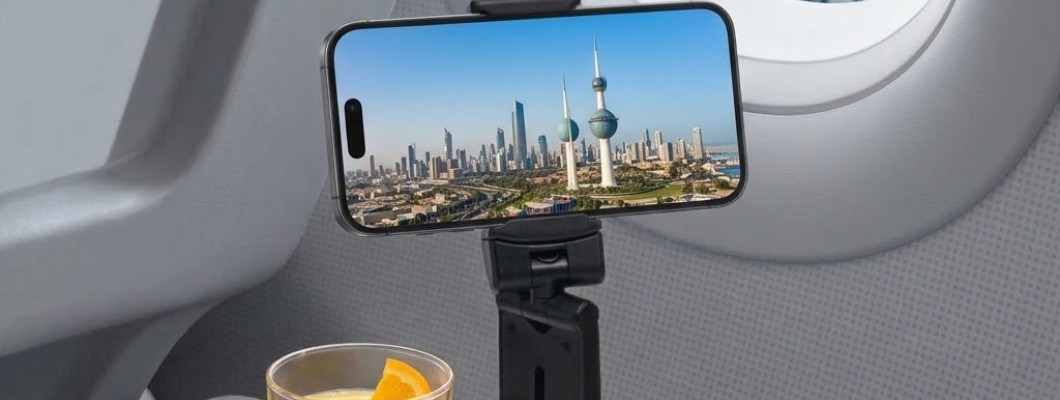
The K&M Shopping Adjustable Airplane & Desk Phone Holder is a black, foldable holder with a stated phone-clamp range of 55–95 mm. It supports portrait and landscape positioning and can be configured for a compatible edge or a flat desktop surface. The listed folded measurements are approximately 93 × 36 mm.
The listing does not specify an exact material, maximum supported weight or maximum mounting-edge thickness. Those missing details should not be replaced with assumptions.
You can review the product here:
https://k-m.store/shop/en/airplane-desk-phone-holder
Use the published information to narrow your selection, then clarify anything essential to your particular phone and workspace. A width range is one useful specification; it is not a complete compatibility guarantee.
Plan the Desk Layout Before Adjusting the Holder
Place the objects needed for your task on the desk first. For a lesson, that might include a notebook and pen. For a meeting, you may need a keyboard or a document beside the screen.
Now identify a position for the phone that leaves those objects usable. Consider the space occupied by the assembled setup, rather than the holder’s size when folded.
An edge-mounted arrangement may leave more of the desktop available, but check what happens below and beside the edge. A drawer, chair arm or bag could interfere with the position.
A desktop arrangement may be easier to move between rooms, but it still needs an appropriate area. Avoid making the phone the last item squeezed into a crowded surface.
Rehearse the ordinary movements of the task before deciding that the layout works.
Adjust the Screen for the Activity
Sit where you expect to work or watch, then assess the screen from that position. A setup can look well aligned from the side while being awkward from the chair.
Choose portrait or landscape according to the content. A document, messaging interface and widescreen video may each benefit from a different arrangement. Check access again after changing orientation.
Notice reflections as well. If a window or lamp obscures the display, consider whether moving the setup slightly would help before changing other settings.
For video calls, open the camera preview. Check the framing and background, then test access to mute and end-call controls.
The goal is not to find a single angle for every situation. It is to create a repeatable arrangement for the task you are doing now.
Rehearse Before Travelling
Try the holder at home using the same phone, case and accessories you intend to pack. This lets you learn the adjustment sequence without working around a confined seat space.
Open the actual content or application you plan to use. Practise pausing playback, reading captions and reaching the controls. If you will use headphones, include them in the rehearsal.
Then practise putting everything away. Remove the device, organise any cable and return the holder to its storage location. Notice whether this process requires you to set several small items down separately.
A successful home trial does not establish compatibility with an aircraft tray. Its purpose is to make the handling familiar and reveal issues with your own equipment before departure.
Keep a Simple Alternative for the Flight
Do not make the entire journey depend on one mounting arrangement. The available seat furniture may differ from what you expected, or there may be times when using the accessory is inconvenient.
Prepare an alternative activity that does not require the setup. This could be listening to something through suitable headphones, reading briefly or leaving the screen packed away.
When seated, assess the real space before opening all your accessories. Follow cabin-crew instructions, and do not assume that a product marketed for airplanes is approved for every position or phase of a flight.
If the available location is unsuitable, leave the holder stored. A travel accessory is useful when it simplifies the journey; you do not need to find a way to use it on every trip.
Prepare for Changes During a Flight
The space in front of you may serve several purposes during the journey. Watching content, receiving a meal and leaving your seat require different arrangements.
Think ahead about where each item will go when you clear the area. Keep a designated place in your accessible bag for the holder, and know where the phone will be stored separately.
Avoid leaving an accessory attached merely because removing it feels inconvenient. If the tray or device must be stowed, take down the setup as instructed.
Before leaving the seat, check for the holder alongside the phone, headphones and cable. Small accessories are easy to overlook when attention shifts to a passport, boarding document or overhead bag.
A clear packing routine is more useful than relying on memory at the end of the journey.
Check Charging and Audio Access
Plan connections before settling on the final phone position. A charging port may remain visible while the connector housing lacks enough room to sit naturally.
Consider the route of the lead as well as its length. On a desk, it should not become caught by a drawer or run through the area where your hands are working.
Changing screen orientation can alter the route, so reassess it afterwards. If the arrangement requires tension on the lead or pressure against the connector, choose another position.
Follow the instructions for your phone, charger and any power source you use. The holder does not establish charging compatibility.
For audio, confirm that the chosen position leaves any required connection accessible. Test the complete arrangement before starting a call or a long viewing session.
Decide Whether Frequent Touch Interaction Changes the Plan
A setup used mainly for watching may not be the most convenient arrangement for typing or repeated tapping.
Try the actual interaction your task requires. Can you pause a lesson easily? Can you reach a menu without moving other objects? Does entering a longer message make you want to pick up the phone?
It is reasonable to remove the device for an interaction that works better in your hands. You do not have to keep it mounted throughout the entire activity.
For a study session, you could watch a section, pause, make notes and continue. For a meeting, arrange the controls you need before joining.
Choose a workflow that suits the task instead of treating continuous mounting as the objective.
Avoid Common Setup Mistakes
Judging fit by the phone model alone
Cases and attachments can change the relevant shape. Assess the device as used.
Confusing the two clamps
A published phone-width range does not describe the thickness of a compatible desk edge.
Choosing a position from a photograph
Check the movement of nearby furniture and the reach from your own seat.
Adjusting everything after inserting the phone
Understand the arrangement first. Remove the device before a major reconfiguration rather than letting it hang while experimenting.
Treating unused adjustment as a problem
You do not need to use every possible position. A straightforward configuration may suit the task well.
Packing without practising removal
Knowing how to put the setup away matters when the surface needs to be cleared.
Review the Holder When Something Changes
Recheck the arrangement after replacing the phone case, adding a rear attachment or changing the desk location. Small changes can affect a setup that previously worked well.
A different charging lead also deserves a fresh look because the connector housing and routing may differ.
During your normal desk tidy-up, inspect the holder and notice whether its behaviour has changed. If it no longer maintains the intended arrangement, stop and assess the cause rather than compensating with another adjustment.
Before storage, remove the phone and any lead caught around the accessory. Follow the supplied care instructions, and avoid forcing unfamiliar movements.
Keep the holder somewhere you can locate easily without having to pull it out from beneath heavier items.
Review What Actually Helped After a Trip
Once you return, consider how the holder fitted into the journey. Was it useful during the flight, at your accommodation or only when working at a desk?
Identify the specific reason if it remained unused. Perhaps you preferred listening to content, had little need for a screen or could not find an appropriate mounting location.
This information helps you pack for the next journey. You may decide the holder belongs in a work bag rather than every travel bag.
Also note any repeated inconvenience. If retrieving a cable or unfolding the accessory was awkward, improve the storage arrangement before buying more accessories.
The aim is a travel kit built around your actual habits, with each item earning its place through a clear purpose.
Before-Use Checklist
The holder has a defined task.
The phone has been assessed with its normal case.
Buttons, ports and attachments have been considered.
Phone compatibility and mounting compatibility have been checked separately.
Missing measurements have been clarified where necessary.
The surrounding surface remains usable.
Screen controls are accessible from the normal sitting position.
Connected leads have a clear route.
The device can be removed without an awkward sequence.
The holder has an accessible storage place.
An alternative is available if the location is unsuitable.
Any applicable crew instructions can be followed promptly.
Quick Answers
Best first check
Identify the phone, activity and mounting location before comparing adjustment features.
Most useful measurement
Measure the phone with its case, then examine thickness and protruding attachments.
Best home rehearsal
Use the actual application and accessories, then practise removing and storing everything.
Best reason to change the setup
Choose another arrangement when compatibility remains uncertain or ordinary use becomes awkward.
Most useful habit
Review the setup whenever the equipment or location changes.
Frequently Asked Questions
Does a phone within the stated width range automatically fit?
Not necessarily. Width is an initial check. The case shape, thickness, rear attachments and gripping position also need consideration. Assess the complete device rather than treating one measurement as sufficient.
Should I remove the case before measuring?
Leave it attached if you intend to use the holder that way. Measuring the bare phone can overlook the part that affects fit during everyday use.
Will an airplane phone holder fit every tray table?
Universal compatibility should not be assumed. Evaluate the available arrangement and follow crew instructions. Do not force the accessory into an unsuitable position simply because airplane use appears in its description.
Is landscape always better for watching content?
No. Choose the orientation that suits the content and available space. Check screen access and the device’s position again after making the change.
Can this type of holder replace a tablet stand?
Do not assume tablet compatibility when it is not specified. Select equipment whose stated requirements match the device you want to support.
Can I charge the phone while it is mounted?
That depends on connector access and cable routing as well as the charging equipment. Check the complete arrangement and follow the device and charger instructions.
What if the clamp presses a side button?
Remove the phone and reassess the gripping position within the product instructions. If suitable contact cannot be achieved, use a different arrangement instead of accepting unwanted button pressure.
Should I keep adjusting the joints with the phone installed?
Remove the device before major adjustments or reconfiguration. Learn the movement of the holder without using the phone as something to push or pull against.
What should I check before a video call?
Review camera framing, background, audio connections and access to call controls. Test any note-taking space too, so you do not need to rearrange the desk during the conversation.
Do I need separate holders for travel and desk use?
Only if your requirements call for them. One accessory may suit both locations, but convenience should not replace checking the actual conditions in each.
Step-by-Step: Build Your First Setup
Step 1: Name the task
Choose one activity, such as watching a lesson or joining a video call.
Step 2: Assess the device
Measure the phone as used and note any case or attachment that affects its shape.
Step 3: Review compatibility
Compare the published information with both the phone and the intended mounting location.
Step 4: Prepare the space
Place the notebook, keyboard or other necessary items before deciding where the screen belongs.
Step 5: Arrange the holder
Follow its instructions and understand the configuration before inserting the device.
Step 6: Test the activity
Check viewing, controls, connections and ordinary hand movements.
Step 7: Practise clearing the area
Remove the phone and return the accessory to its storage place.
Step 8: Reassess when needed
Repeat the relevant checks after changing equipment or moving to another location.
Conclusion
A useful airplane and desk phone holder fits more than the width of a device. It fits the task, the available space and the way you set up and pack away your belongings.
Start with the phone and mounting requirements, rehearse the complete activity and remain willing to use another arrangement when circumstances change. That approach makes the accessory part of a practical routine rather than another object competing for space.
For phone accessories and travel items, browse K&M Shopping:
Quick Summary
Assess the phone with its everyday case and attachments.
Check the mounting location separately from the phone grip.
Plan the surrounding desk space before adjusting the screen.
Include charging, audio and retrieval in the rehearsal.
Keep an alternative for unsuitable travel conditions.
Follow crew instructions and review the setup after equipment changes.
Read Also
Luggage Cup Holder Guide for Travel
https://k-m.store/shop/en/luggage-cup-holder-coffee-travel-guide
This related guide can help you assess another travel accessory. Consider each item’s purpose and compatibility independently when deciding what belongs in your bag.
Leave a Comment