
Adhesive Wall Phone and Remote Holders: How to Check Fit, Placement and Charging Access
Adhesive Wall Phone and Remote Holders: How to Check Fit, Placement and Charging Access
A phone on the bedside table, a remote between the sofa cushions and a charging cable behind the desk can turn small everyday tasks into repeated searches. Giving each item a reliable place sounds simple, but the location has to work with the way you actually use the room.
An adhesive wall holder can provide that place without drilling. Choosing one involves more than finding an empty patch of wall, however. The device must fit, your hand needs room to retrieve it, and any charging cable should reach without pulling on the holder.
This guide explains how to assess a wall phone and remote holder before buying, plan its position and build a practical return routine. The aim is a useful storage point that remains easy to use after the initial tidy-up.
Quick Answer
Choose a wall holder by checking the device with its case, the usable pocket dimensions, the mounting surface and the clearance needed to lift the device out. If charging is part of the plan, check connector access and cable routing too. Do not treat an external width measurement as proof that your phone will fit.
Contents
Start with the item you keep misplacing
Check pocket fit before wall space
Understand the available product information
Test the location through everyday movements
Plan charging access separately
Decide whether adhesive mounting suits the surface
Prepare and install carefully
Apply the idea in different rooms
Avoid common organisation mistakes
Maintain a useful daily routine
Pre-installation checklist
Quick answers
Ten frequently asked questions
Step-by-step starting plan
Conclusion and quick summary
Start with the Item You Keep Misplacing
Before choosing an organiser, identify one repeated inconvenience. Perhaps the television remote disappears every evening, or your phone ends up beneath papers while charging. These are different problems and may need different locations.
For a remote, the best starting point is usually where you finish using it. For a phone, the location may depend on when you put it down: arriving home, sitting at a desk or preparing for bed.
Give the pocket one primary purpose. If it alternates unpredictably between a phone, receipts, spare cables and several remotes, the space may be occupied when you need it most.
Ask everyone who shares the room which item should live there. A simple agreement often matters more than adding more storage. The holder becomes useful when returning the item is an obvious action, rather than another household rule that nobody remembers.
Check Pocket Fit Before Wall Space
Measure the item in the condition in which you normally use it. For a phone, that means leaving its everyday case attached. Include anything that projects from the back or edges, such as a grip, card attachment or protective corner.
Record width, thickness and overall shape. A rounded remote may be widest near its buttons, while a phone case may become thicker around the camera area. A measurement taken at the narrowest point can create a misleading impression.
Next, distinguish the outside dimensions of the holder from the space available inside. The walls of the pocket occupy part of its overall size. An external measurement describes the product footprint; it does not establish the usable opening.
If internal measurements are unavailable, ask the retailer before ordering. Send your device measurements and describe any case attachment. This is more useful than asking whether the holder fits “a large phone.”
Comfortable removal matters as much as insertion. A device that needs force to slide in, or pulls the holder forward when removed, is not a practical fit.
Understand the Available Product Information
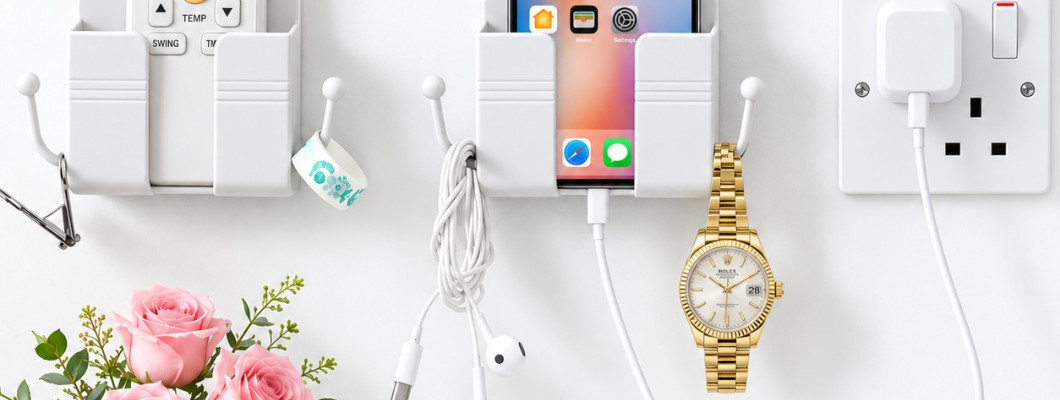
The K&M Shopping wall-mounted phone and remote holder is a white plastic organiser with one pocket, two side hooks and a bottom cable opening. Its published external dimensions are 9 cm wide, 8.7 cm high and 2.5 cm deep. It uses adhesive backing.
The listing does not state the internal pocket dimensions, maximum load or a specific adhesive bonding time. These details should be clarified when relevant to your intended use.
You can review the product here:
https://k-m.store/shop/en/kn11-comment-stand-1
Use those specifications to begin your assessment, then compare them with your device and planned location. Product photographs help explain the arrangement, but they cannot establish hidden clearances or guarantee compatibility with a particular case.
Test the Location Through Everyday Movements
An empty wall is not necessarily a convenient storage location. Test the proposed position from the place where you normally sit or stand.
Beside a sofa, sit down and reach towards the intended spot. Consider whether you would need to twist behind the armrest, reach across another person or move a cushion every time.
At a desk, check the position with the chair in its normal place. Then pull the chair back, open nearby drawers and move any adjustable lamp. A holder that looks well positioned in an empty photograph may sit directly in the path of everyday movement.
Leave room above the pocket for the device to rise out. Also allow space for your fingers; the device itself is only part of the retrieval movement.
Before exposing any adhesive, hold the empty organiser in place with one hand and assess access with the other. Do not leave it temporarily balanced or use an unsecured holder to support a phone.
Plan Charging Access Separately
Storage fit and charging fit are separate checks. A phone may sit comfortably in a pocket while its charging connector remains awkward to reach.
Consider the connector housing, not only the cable. A thick plug or angled connector may need more room than the opening appears to provide. The phone’s charging port also has to align with the available route.
Lay out the cable before choosing the final position. Follow its path from the charger to the phone and consider what happens when you retrieve the device. There should be no need to tug the cable to gain access.
Keep the route away from moving drawers, chair wheels and places where people walk. Avoid trapping the lead behind furniture that is regularly pushed against the wall.
The holder is storage equipment, not a charging device. Continue following the phone and charger manufacturers’ instructions. If the arrangement makes the connector bend sharply or prevents normal access, use a different charging location.
Decide Whether Adhesive Mounting Suits the Surface
First identify the finish you want to mount onto. “Wall” could mean painted plaster, tile, wallpaper or another surface, and those finishes should not be treated as interchangeable.
Check the mounting guidance against that exact finish. In particular, do not assume that cleaning will make a textured or fragile surface suitable. A tidy appearance does not tell you how securely the finish itself is attached underneath.
For this holder, the listing specifies a smooth, clean, dry surface and excludes rough or damp areas, wallpaper and weak paint. It also advises avoiding direct water and high heat.
If you rent your home, check what alterations are permitted. Installation without drilling does not establish that removal will leave the finish unchanged.
Where the surface is unsuitable or uncertain, consider a freestanding organiser or another storage method whose installation requirements you can meet. Choosing a different location before mounting is simpler than dealing with an unsuitable attachment afterwards.
Prepare and Install Carefully
Read any instructions supplied with the product before opening the adhesive backing. Confirm that you have identified the intended mounting face and that the holder is the correct way up.
Prepare the surface using a method suitable for its finish. Do not experiment with a strong cleaner simply because it removes grease elsewhere. Let the area dry completely before proceeding.
Mark the intended position using a method that will not damage the surface. Check the orientation against nearby furniture rather than relying only on a quick visual guess.
Apply the holder according to its instructions, pressing as directed. If the instructions do not provide a waiting period before loading, obtain guidance rather than borrowing a time from another adhesive product.
Check the empty attachment before placing a device inside. This is a preliminary check, not proof of a particular load capacity. Do not conduct a strength test by hanging extra objects from it.
Apply the Idea in Different Rooms
Beside the bed
Decide whether the holder is mainly for overnight storage or occasional charging. Place it where you can retrieve the phone without reaching behind the bed or disturbing another person.
Consider bedding movement too. A location covered by a pillow or blanket during normal use will be inconvenient, even if it looks accessible when the bed is neatly made.
In the living room
Choose the remote used most frequently and give it the designated pocket. If the room has several controls, avoid assuming they will all fit together.
Explain the return location to other household members. A visible, reachable position is easier to maintain than one hidden behind furniture for the sake of appearance.
At a desk
Identify whether the phone needs to be stored or viewed. If you regularly use it for video calls or follow instructions on its screen, a viewing stand may suit that task better.
A wall pocket can instead provide a place to put the phone between uses, keeping the main work area available for the current task.
Avoid Common Organisation Mistakes
Choosing a position before checking the device
It is tempting to mount the holder immediately and deal with fit afterwards. Reverse that order. Confirm the device arrangement before committing to a location.
Using every available part
An empty hook does not need an object. Adding accessories because space exists can make the pocket harder to reach. Assign storage only where it solves a repeated need.
Treating cable length as flexibility
A cable that reaches only when stretched leaves little freedom for everyday movement. Plan around normal retrieval, not the furthest point the lead can reach.
Changing the holder’s purpose constantly
If the pocket becomes temporary storage for whatever is nearby, the intended device loses its place. Keep miscellaneous items elsewhere.
Ignoring changes in the room
A new bedside table, thicker phone case or rearranged desk can alter a previously useful setup. Recheck the arrangement whenever one of those elements changes.
Maintain a Useful Daily Routine
The easiest routine is linked to an action that already happens. Return the remote when switching off the television. Put the phone away when finishing a desk session, if that matches your use.
Keep the action short. If returning the device requires moving another item, untangling a lead and adjusting a hook, the arrangement needs simplifying.
In shared rooms, agree on what happens when the pocket is occupied. A single pocket should not become a competition between different devices. Give the second item a separate, clear location.
Do not use the organiser as a reminder pile. Notes, receipts and unused cables can gradually fill a space originally chosen for one frequently used object.
A useful organiser should reduce small decisions. When you already know where an item belongs, you spend less effort deciding where to leave it.
Review the Setup Weekly
During your usual room tidy-up, look at how the holder is actually being used. Is the intended item there, or does it still end up somewhere else?
If the device is repeatedly left on a nearby table, investigate the reason. The pocket may be inconvenient to reach, the cable may be awkward, or the holder may have been assigned the wrong purpose.
Check whether new accessories have accumulated. Remove anything without a clear reason to stay. The aim is to preserve access, not fill every available space.
Also inspect the attachment and the holder’s condition. The product guidance advises stopping use if the adhesive separates or the pocket or hooks crack.
Treat replacement accessories as a reason to reassess. A different phone case or charging lead can change the arrangement even when the phone itself remains the same.
Pre-Installation Checklist
The holder has one clear primary purpose.
The device has been measured with its usual case or attachments.
Usable pocket space has been confirmed.
The device can be removed without forcing it.
The mounting finish matches the installation guidance.
The position works from the usual sitting or standing place.
There is clearance above and around the pocket.
Nearby doors, drawers and furniture remain unobstructed.
Any charging connector has adequate access.
The cable route does not depend on tension.
Installation and bonding instructions are understood.
Uncertain specifications have been checked before use.
Quick Answers
Best first measurement
Measure the device as used, including its case. A bare-phone measurement can overlook the part that causes a fit problem.
Best first location test
Rehearse reaching for the device from your normal position. This reveals access problems that a visual check can miss.
Best reason to choose another solution
Choose another arrangement when fit, surface compatibility or everyday access remains uncertain. Wall mounting should solve a practical problem.
Best routine to maintain the setup
Return the item at the end of the activity associated with it, such as finishing television viewing or leaving the desk.
Frequently Asked Questions
Is a wall phone holder the same as a phone viewing stand?
No. A storage pocket provides a place to put a device. A viewing stand is selected around screen angle and interaction. Decide which function you need before comparing products.
Can I judge phone compatibility from the holder’s outside width?
No. Compare the device with usable internal space. External measurements include the structure of the holder and cannot confirm the size of its opening.
Should I measure my phone with the case attached?
Yes, if you normally keep the case on. Include protruding grips or card attachments as well. The relevant shape is the one you will place in the holder every day.
Where should a remote control holder be positioned?
Start near the place where the remote is normally used, then test the reach. Avoid positions that require stretching behind furniture or moving other objects before retrieval.
Can the phone remain connected while I remove it?
That depends on the cable arrangement and available slack. Plan the movement in advance, and disconnect when necessary rather than pulling against the connector or holder.
Does installation without drilling mean removal cannot damage paint?
No. Those are separate considerations. Check compatibility with the finish and obtain removal guidance before mounting, especially where maintaining the existing appearance is important.
How do I decide what belongs on the side hooks?
Choose only accessories permitted by the product guidance that genuinely belong at that location. Keep access to the main pocket clear, and do not assume hooks have a stated load rating when none is provided.
How long should I wait before loading an adhesive holder?
Follow the instructions for that product and adhesive. If no waiting period is provided, ask the retailer. A time specified for a different mounting product is not a reliable substitute.
What should I do if the device fits but is difficult to retrieve?
Do not force the arrangement. Check whether the case catches, the pocket is too tight or the overhead clearance is inadequate. A practical fit includes easy insertion and removal.
When should I reassess an existing setup?
Reassess after changing the device, case, cable or nearby furniture, and whenever the attachment looks different. Also reconsider the position if people consistently leave the item elsewhere.
Step-by-Step Starting Plan
Step 1: Choose the problem
Name the item you keep searching for and the room where that happens.
Step 2: Define the job
Decide whether the holder is for storage, charging access or keeping a remote in one place.
Step 3: Confirm compatibility
Measure the device and obtain the pocket information needed to compare it properly.
Step 4: Rehearse the location
Check reach, removal clearance, furniture movement and the cable route before exposing adhesive.
Step 5: Follow the mounting instructions
Prepare the appropriate surface and observe the product’s installation requirements.
Step 6: Begin with a simple arrangement
Use the pocket for its intended item and keep additional accessories to a minimum.
Step 7: Review real use
Adjust the routine if returning the device feels inconvenient, and stop using an attachment that shows deterioration.
Conclusion
A useful wall phone or remote holder starts with a clear purpose, a confirmed fit and a location that matches everyday movement. Its value comes from making one repeated task easier: putting an item somewhere predictable and retrieving it comfortably.
Take time to check the pocket, the surface and any charging arrangement before installation. Those small checks help you choose a setup you can continue using naturally.
For household organisation products and other practical accessories, browse K&M Shopping:
Quick Summary
Choose the main item before choosing the wall location.
Compare internal pocket space with the device in its everyday case.
Test reach and removal clearance through normal movements.
Treat charging access as a separate compatibility check.
Follow the actual mounting instructions and clarify missing information.
Keep the arrangement simple and review it when equipment changes.
Read Also
Adhesive Wall Screws and No-Drill Mounting: Selection and Use Guide
https://k-m.store/shop/en/adhesive-wall-screws-no-drill-mounting-guide
This related guide discusses another mounting option. Assess each product according to its own installation requirements; do not transfer load or surface assumptions between different adhesive accessories.
Leave a Comment