
How to Choose a Bed or Floor Table for Studying, Laptop Use and Meals
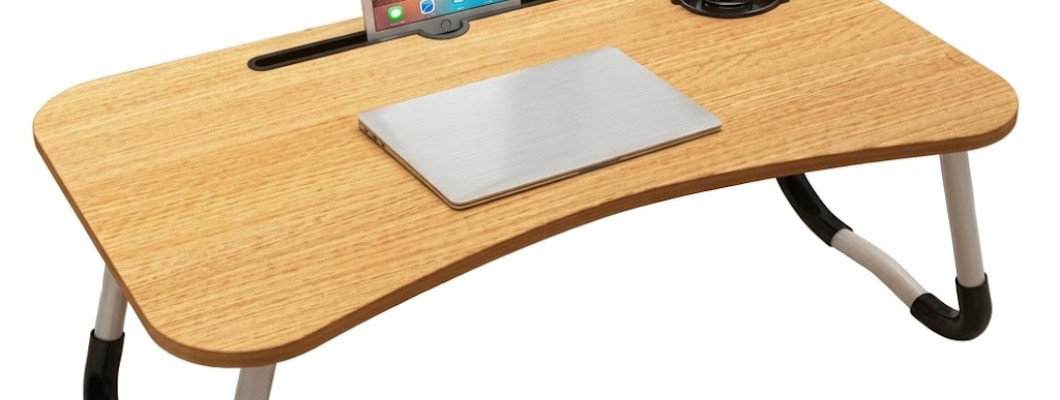
How to Choose a Bed or Floor Table for Studying, Laptop Use and Meals
You open a notebook on the bed, then look for somewhere to put a pen and the book you are reading. Later, the same space needs to accommodate a meal. A small portable table seems like a straightforward solution, but its usefulness depends on more than providing another surface.
The table needs to fit your belongings, your sitting position and the place where its supports will rest. It also needs somewhere to go when the activity ends. A setup that works for reading may not provide enough room for a laptop, mouse and notebook together.
This guide explains how to assess a multipurpose bed or floor table before ordering and how to organise it for different tasks. It also covers the confirmed details of the K&M Shopping table, including the specifications you should verify rather than assume.
Quick Answer: What Should You Check Before Buying a Bed Table?
Identify your main activity, measure the items you will use together and confirm the tabletop dimensions, height and clearance underneath. Check whether the table can stand securely in the intended location.
For laptop use, allow room for the device and any essential accessories while keeping its ventilation openings clear. For meals, remove electronics and use stable containers. Empty the table before moving it, and do not assume folding legs, adjustable height or a stated weight limit unless the product information confirms them.
Contents
Choose your main activity.
Measure a working arrangement.
Check height, clearance and stability.
Review the K&M Shopping table.
Set up for study, laptops and meals.
Switch between activities.
Plan shared use and storage.
Avoid common mistakes.
Follow a practical checklist.
Read ten frequently asked questions.
Choose the Main Job Before Comparing Tables
“Multipurpose” describes several possible uses, but it does not mean every task will fit comfortably on the same surface. Start with the activity you expect to do most often.
Reading may require only a book and a place for notes. Written homework may need an open textbook, notebook and space for your writing hand. Laptop work can introduce a mouse, charger and reference materials.
List the essentials separately from optional items. If a phone does not need to remain beside the notebook, it can have another location. This helps you assess the surface you actually need instead of trying to fit everything you own into one arrangement.
Measure Items in Their Working Position
Closed books and folded devices can give a misleading impression of the space required. Arrange your belongings on an existing surface as you would use them, then measure that layout.
Open the textbook to a normal spread. Leave space to turn pages and move your hand. If you use a mouse, include its working area rather than measuring only the mouse itself.
For meals, arrange the intended plate, bowl and utensils without stacking them. Check that each item has a stable position and can be reached without pushing another towards the edge.
These measurements give you something concrete to compare with the table dimensions once the seller provides them.
Check Height and Space Underneath
A tabletop can accommodate your belongings yet still be unsuitable for your sitting position. Height and clearance underneath matter as much as the surface footprint.
Consider the position you intend to use rather than an idealised pose. Sitting directly on the floor differs from sitting on a cushion, and different cushions change your height relative to the table.
Check whether there is room for your legs and whether you can approach the surface without twisting around its supports. Also think about getting up: you should not need to use the table to support your body.
If the dimensions are missing, ask before ordering. An attractive photograph cannot establish whether the table will fit your particular arrangement.
A Flat Top Does Not Guarantee a Stable Setup
The tabletop may be level while the surface underneath allows the whole table to move. A mattress, thick bedding or uneven support can change the result.
Place the table empty in its intended location first. Check every support point, then observe what happens when you sit down or change position nearby.
If the table rocks or tilts, change the setup before adding a device or meal. Do not compensate by placing improvised objects under one side.
The words “bed table” do not guarantee stability on every bed. If the intended surface cannot provide secure support, consider a different location or another table format suited to that environment.
What the K&M Shopping Table Offers
K&M Shopping lists the Multi-Purpose Bed Table for Study, Work and Meals as a portable household table for use while sitting on a bed or the floor.
Its stated uses include reading, writing, laptops, tablets and meals. The description identifies it as lightweight and easy to move, with black and wood-effect options. The package contains one table in the selected option.
You can review the product here:
https://k-m.store/en/multi-purpose-bed-table
The listing does not state numerical dimensions, height or maximum load capacity. Folding legs are also unconfirmed. “Wood-effect” describes the appearance; it does not establish that the table is made from natural wood.
Ask Questions That Resolve Your Actual Needs
When specifications are missing, make the enquiry specific. Ask for the usable tabletop width and depth, the height and the space available between supports if those measurements affect your setup.
If storage depends on folding, ask whether the legs fold and what the stored dimensions are. Do not rely on the fact that similar-looking tables sometimes have that feature.
For a particular device or item, ask about suitability and any stated load limit. A description such as “lightweight” concerns portability, not necessarily the weight the table can support.
Clear questions are more useful than asking only whether the table is “big enough” or “comfortable.”
Set Up a Study Session with Fewer Items
Begin with the main book or notebook and the writing tools you need. Position them so pages can be turned and your hand can move without repeatedly shifting objects.
If a textbook and notebook do not work side by side, consider whether reading and note-taking can happen in stages. If constant comparison is essential, a larger surface may be the better choice.
Check the lighting after arranging the table. Notice whether your hand casts a shadow across the page or whether the light encourages you to move into an awkward position.
Keep spare materials elsewhere. A smaller active selection makes it easier to judge whether the table suits the task itself.
Assess the Whole Laptop Arrangement
Laptop compatibility involves more than screen size. Compare the actual base dimensions with the usable surface and check that the device can sit securely.
Open the screen to the position you need. Confirm that doing so does not require the laptop to be balanced at the edge or shifted into an unstable position.
Follow the device manufacturer’s ventilation guidance. Do not place cloth, papers or other items over its ventilation openings. The table is not described as a cooling stand, so do not expect an additional cooling function.
Include the mouse and any necessary notes in the assessment. A table that holds the laptop alone may not accommodate your full workflow.
Plan the Charging Cable Before Sitting Down
A charging cable can affect the setup even when it occupies little tabletop space. Check its route between the device and the power source.
Avoid a cable stretched across a walking route or pulled tightly enough to tug on the laptop. Consider what happens when you stand up, move your legs or relocate the table.
Keep connectors away from food and drinks. Before moving the table, deal with the cable as well as the visible objects on top.
This is a useful part of the first trial: if the available cable route makes the intended location impractical, find another location rather than repeatedly working around the same obstruction.
Keep Drinks Separate from Electronics
A compact surface can leave little room for a cup without bringing it close to a laptop, notebook or table edge. Choose a separate stable location for the drink when possible.
Do not assume the table includes a cup holder, raised spill barrier or other feature that is not confirmed in its description.
If there is nowhere suitable for a drink, pause the electronic activity or put the device away first. Adding more objects to an already crowded arrangement rarely improves it.
Remember that movement on a soft supporting surface may affect the table even without direct contact with the cup. Secure placement matters before any drink is introduced.
Prepare a Separate Arrangement for Meals
Remove books, stationery and electronics before using the table for food. Clean and dry the surface, then arrange suitable plates and containers with their weight distributed rather than concentrated on one side.
Start with a simple meal that does not require many dishes. If the arrangement is crowded, reduce the number of items or use another eating location.
Heat resistance is not stated. Do not assume that hot cookware can be placed directly on the surface. The table should also not be treated as a chopping board or food-preparation surface.
Before serving, check stability again in the actual sitting position. An earlier successful writing session does not replace this check.
Reset the Surface Before Returning to Study
After the meal, remove dishes and inspect the tabletop and edges for crumbs or spilled liquid. Wipe it appropriately and dry it before returning paper or a device.
A surface can look clear while still carrying moisture or food residue. Check the area where the notebook or laptop base will rest.
Give the removed study materials a known temporary location. Otherwise, switching activities can create a second problem: books on the bed, pens under bedding and a charger moved somewhere unexpected.
Multipurpose use works best as a sequence of clear arrangements. It does not require all possible activities to remain set up on the table at once.
Make Shared Use Easy to Understand
If several people use the table, agree that it returns empty and clean. This prevents one person’s belongings from being moved without a clear destination.
Each user should check the position for their own task. Differences in sitting height, equipment and preferred layout can make the same placement suitable for one person but inconvenient for another.
For children using it for homework, an adult should check stability and the overall setup. The table must not become climbing equipment or a step to reach a shelf.
Keep the shared rule simple: prepare the surface for the current activity, clear it afterwards and leave it ready for the next user.
Plan Storage Before Ordering
A portable table still needs a place to stand when it is not in use. Identify that location before buying, particularly in a small room.
Do not assume it will slide under the bed or fit beside a wardrobe. Those decisions require actual measurements, and the legs cannot be assumed to fold.
Check that storage will not block a door or walking route. Also consider whether removing the table again will require shifting several unrelated objects.
Keep frequently used materials nearby in their own place rather than permanently on the tabletop. This preserves the benefit of being able to move the table without first clearing accumulated clutter.
Know When Another Table Format Is Better
Portability, wheels, folding and adjustability are separate features. One should not be inferred from another.
If your task requires a particular height, a changing screen angle or use from a conventional chair, those requirements should guide the choice. A simple bed or floor table may not meet them.
Likewise, equipment requiring a confirmed load rating needs a product with suitable published information. Do not use an unspecified table as an experiment.
Changing the table format can be more practical than repeatedly adjusting your belongings to compensate for missing space or height. The useful choice is the one that matches the task you actually perform.
Avoid Common Buying and Setup Mistakes
One mistake is choosing by the laptop’s advertised screen size alone. That measurement does not establish the base footprint or space needed for accessories.
Another is treating the wood-effect option as a material specification. Without confirmation, it does not justify assumptions about natural wood, water resistance or care products.
During use, avoid overloading one side, letting items overhang or moving the table with belongings still on top. Empty it first and lift the table body with both hands.
Do not sit, stand or lean your body weight on it. It is a household surface, not confirmed body-support equipment or a medical transfer aid.
Follow a Simple Care Routine
The product page advises wiping the tabletop with a soft, slightly damp cloth and drying it immediately. Remove spills rather than leaving them on the surface.
Avoid immersion and abrasive cleaners or cleaning tools. Because the exact material and water resistance are unspecified, treat the table as an indoor item for dry conditions.
Inspect the support points regularly, especially after moving it or an accidental knock. Stop using it if a part becomes loose or damaged.
Do not try to compensate for structural problems by rearranging the items on top. The table needs to be stable before the layout of books, devices or dishes becomes relevant.
Review the Setup When Something Changes
A new mattress, cushion, laptop or storage arrangement can change how the table works. Recheck the relevant measurements and stability rather than relying on an earlier successful trial.
Notice whether the table has become a permanent holding area for unrelated belongings. If moving it now requires a lengthy cleanup, return those objects to their own places.
Also review the task itself. Occasional reading may have become regular work involving several devices and documents.
If the setup no longer provides enough space, recognise that change. Multipurpose furniture is useful when its capabilities match the current need, not when every activity is forced onto the same surface.
Before-You-Buy Checklist
Identify the activity you will do most often.
Measure essential items in their working positions.
Confirm tabletop dimensions and height.
Check the clearance needed underneath.
Assess the intended supporting surface.
Verify folding or adjustment if either is essential.
Ask about a load limit when your use requires one.
Identify a realistic storage location.
Choose the available finish without assuming its material.
Plan separate arrangements for electronics and meals.
Quick Answers
For writing: Allow space for your hand and turning pages, not just the closed notebook.
For laptops: Check the actual device footprint and keep ventilation openings clear.
For meals: Remove electronics and avoid a crowded arrangement.
For moving: Empty the surface first.
For storage: Confirm measurements and any folding mechanism before relying on them.
For stability: Test the empty table in the intended location before adding belongings.
Frequently Asked Questions
1. What is a multipurpose bed and floor table?
It is a portable surface for activities such as reading, writing, device use and meals while sitting on a bed or the floor. Suitability still depends on dimensions, placement and the specific task.
2. Can the K&M Shopping table hold a laptop?
Laptop use is listed, but universal compatibility is not established. Compare the device’s actual dimensions with the tabletop and confirm that it can rest securely with ventilation openings unobstructed.
3. What are the table’s dimensions?
The available listing does not state numerical dimensions or height. Ask for measurements before ordering if the table must fit a particular device, sitting arrangement or storage space.
4. Are the legs foldable?
A folding mechanism is not confirmed in the product description. If folding is important, verify it before purchase rather than relying on the appearance of similar products.
5. Can the height or tabletop angle be adjusted?
Neither feature is confirmed in the available information. If adjustment is essential, choose based on verified specifications rather than assuming that a portable table includes it.
6. Is the wood-effect option natural wood?
The finish describes the appearance. The exact material is not stated, so it should not be described as natural wood without additional confirmation from the seller.
7. How much weight can it support?
A maximum load capacity is not published. Avoid heavy equipment and never stand or sit on the table. Confirm suitability before using items that require a specific load rating.
8. Is it suitable for meals on a bed?
Meals are a listed use, provided the table stands securely and containers are arranged appropriately. If mattress movement makes it tilt, choose another location before serving.
9. How should it be cleaned?
Use a soft, slightly damp cloth and dry the surface immediately. Avoid immersion and abrasive cleaning materials, and remove spills promptly rather than assuming water resistance.
10. Can it replace a permanent desk?
That depends on the task, equipment and sitting arrangement. Do not assume it will suit extended daily work. If the available space or height is unsuitable, use a different setup.
Begin with One Activity
For the first trial, choose a straightforward task with only the essential items. Position the empty table, check its supports and then add the book or device in a balanced arrangement.
Test the movements the activity requires before adding anything else. Afterwards, identify the specific limitation, if any: surface space, height, stability or storage.
Review the product and current options here:
https://k-m.store/en/multi-purpose-bed-table
For other products available from K&M Shopping, visit:
A useful table gives the current activity enough space on a stable surface. Confirm the measurements, keep the arrangement focused and reset it whenever the task changes.
Leave a Comment